 Smaller Plates
Text messaging program
Smaller Plates lets you log meals by text. Send a photo or description of what you ate to (877) 382-6924 and we reply with a calorie estimate you can log with one tap. You can also choose to get meal reminder texts.
How you opt in
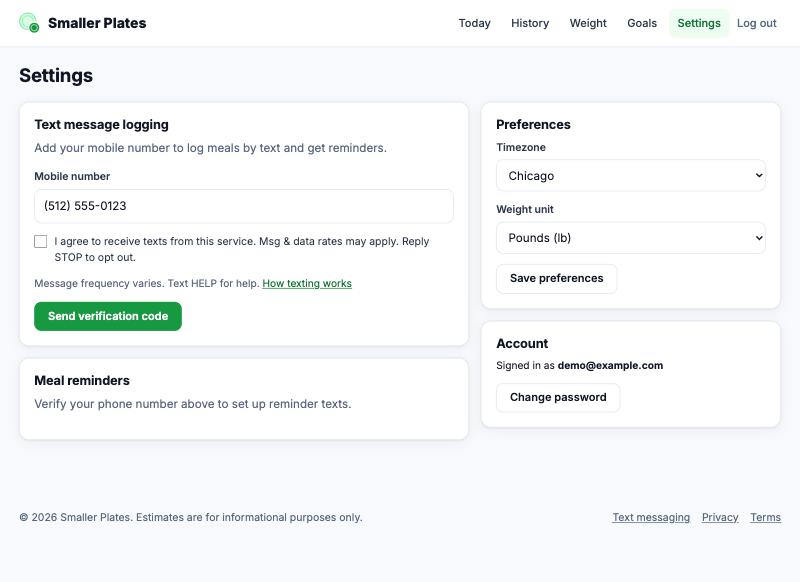
Texting is off until you turn it on. After creating an account, go to Settings, enter your mobile number, and check the consent box shown below. We then text you a 6-digit code, and texting starts only after you enter that code to confirm the number is yours. Reminder texts are a separate setting that you turn on and schedule yourself.
Messages you'll receive
- A one-time verification code and a confirmation when you sign up.
- Replies to the meals you text us (calorie estimates and logging confirmations).
- Optional meal reminders at times you choose.
Message frequency varies with how often you text us and the reminders you set. Message and data rates may apply.
Help and opting out
Text HELP for help, or email hello@smallerplates.com. Text STOP at any time to stop all messages, and START to resume. You can also remove your number in Settings.
Carriers are not liable for delayed or undelivered messages. We never sell or share your phone number or SMS consent with third parties for marketing. See our Privacy Policy and Terms.